
We run a distributed team out of Surat and work with clients from California to Sydney, so "what time is this for everyone?" is a question we answer every single day. Get it wrong and someone takes a call at 5 a.m., resents it, and quietly stops showing up. Get it right and a global team feels like it's in one room.
Here is how we actually schedule meetings across time zones, the rules of thumb we use, and a free planner we built so you can find the best meeting time in about thirty seconds.
Start from working hours, not the clock
The mistake most people make is converting one time and eyeballing it. "It's 3 PM here, so that's… 8:30 PM in India? Close enough." It isn't close enough, and it ignores the only thing that matters: is everyone inside their working day?
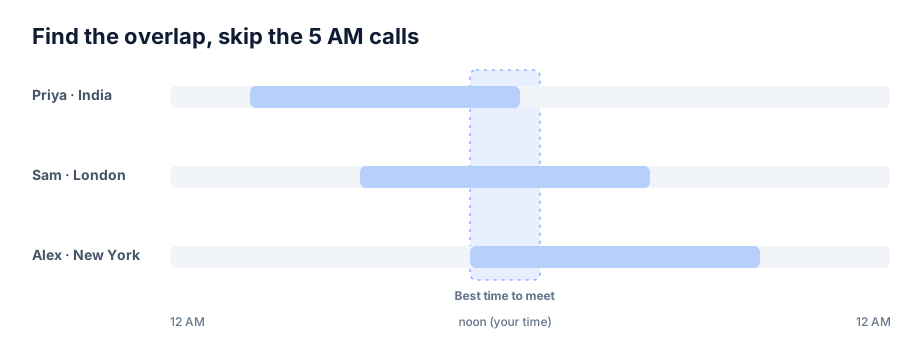
So flip the question. Instead of "what time is the meeting," ask "which hours are inside working hours for every person at once." That set of hours is your time zone overlap, and any slot inside it is fair game. Everything else is asking someone to give up their evening or their sleep.
The fastest way to see this is to lay each person's working hours on the same 24-hour line and look for where the bars overlap. That's exactly what our Team Time Zone Planner does: add each teammate, set their hours, and it highlights the overlap and the best window to meet, in your local time.
How much overlap does a remote team actually need?
Short answer: two to four hours a day. That's enough for one shared meeting plus some real-time back-and-forth, while leaving most of the day for focused, heads-down work. Below two hours, every sync becomes a negotiation and you should lean harder on async. Above four, you barely feel the distance.
When we hire or set up a client engagement, this is the number we anchor on. We tell clients plainly that we can align at least four overlapping hours with any time zone, because we've learned that's the threshold where a remote team stops feeling remote.
Find a meeting time that works for everyone
Once you know the overlap, picking the slot is easy:
- Aim for the middle of the overlap, not the edges. A meeting at the very start or end of someone's day is the first thing they'll cancel.
- Protect lunch. People forget that the other side eats too. Our planner lets each person add a lunch break or a split shift, so the "free" band doesn't accidentally land on someone's only break.
- Write the time in everyone's local zone in the invite. "3 PM London / 7:30 PM India / 10 AM New York" removes all doubt and the inevitable "wait, is that my time?".
When no time works for everyone
Sometimes the map just doesn't cooperate. India to the US West Coast, for example, has almost no overlap inside normal hours. When that happens:
- Rotate the pain. If someone has to take an early or late call, don't make it the same person every week. Alternate who flexes.
- Make it count. If you only get the whole group together once or twice a week, treat those slots as sacred and push everything else to async updates.
- Go async by default. Record the decision, not the discussion. A short written update or a Loom often beats a meeting nobody's awake for.
Schedule calls with overseas clients
Client calls have a higher bar: you want the slot to land inside business hours on both sides, not simply a time when everyone is technically awake. Add the client's city next to your team, keep everyone at 9-to-5, and take the overlap. If you regularly call the same region, we put together quick references for the common routes, like the best time to call across time zones between India, the USA, the UK and Australia.
Watch out for daylight saving time
The single sneakiest bug in scheduling is daylight saving. Twice a year a chunk of the world shifts by an hour, and for a week or two the US and Europe are on different schedules than usual. A meeting that was comfortable in June can land an hour off in November. Don't do this math in your head. Any tool you use should compute the overlap with each zone's current daylight saving rules, so the window stays correct as clocks change.
Questions
Frequently asked questions
How many hours of overlap do remote teams need?
Two to four hours a day. That is enough for one shared meeting plus some real-time back-and-forth, while leaving most of the day for focused, heads-down work. Below two hours, every sync becomes a negotiation and you should lean harder on async. Above four, you barely feel the distance.
What is the best time to meet across time zones?
Pick a slot in the middle of the window where everyone's working hours overlap, not at the edges. A meeting at the very start or end of someone's day is the first thing they will cancel. Start from working hours rather than converting one clock time, and check that the slot sits inside the working day for every person at once.
How do you find a meeting time that works for everyone?
Lay each person's working hours on the same 24-hour line and look for where the bars overlap; any slot inside that band works. Aim for the middle of the overlap, protect each person's lunch or break, and write the time in everyone's local zone in the invite. Our free Team Time Zone Planner does this in about thirty seconds, with no login.
How do you schedule a call with an overseas client?
Add the client's city next to your team, keep everyone at 9-to-5, and take the overlap. Client calls have a higher bar than internal syncs, because you want the slot to land inside business hours on both sides, not simply a time when someone is technically awake. For routes you call often, a quick reference for the region saves you the repeated math.
What do you do when no meeting time works for everyone?
Rotate who takes the awkward early or late call so it is not the same person every week. When you only get the whole group together once or twice a week, treat those slots as sacred and push everything else to async updates. Recording the decision in a short written note or a Loom often beats a meeting nobody is awake for.
How do you handle daylight saving time in scheduling?
Let a tool compute the overlap using each zone's current daylight saving rules, and do not do the math in your head. Twice a year a chunk of the world shifts by an hour, and for a week or two the US and Europe are on different schedules than usual. A meeting that was comfortable in June can land an hour off in November, so the window has to stay correct as clocks change.
The short version
Find the overlapping working hours, keep two to four hours of daily overlap, meet in the middle of the band, protect lunch, rotate the awkward slot when there isn't one, and let a tool handle daylight saving. If you'd rather not draw the bars yourself, our free Team Time Zone Planner does it in a few clicks, no login, and you can share the link with your whole team.
This is the same discipline we apply when we build and run software with distributed teams. If you're putting one together, that's what we do.